|
| |
| The AmericanSAS institute
lays down the standards for statistical analysis software in
the international medical field. AutoSAS21 can be used by first-time
users of SAS for serial operations like data input, selection
of statistical methods and execution of statistical calculations
in Microsoft Excel. |
| |
| |
| AUTOSAS21Start-up
screen |
AUTOSAS21
Order of operations |
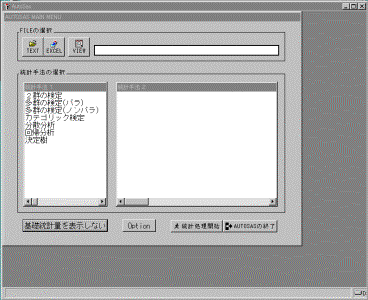
Above Screen in Japanese only |
Start
AutoSAS 21 from Microsoft Excel
Select data file (Excel,TEXT)
Check selected data
Classify statistical methods/select statistical
method
Execute verification
Verification results appear
Output of verification results in Excel
Return to AutoSAS21 main menu |
|
| Selecting
a data file |
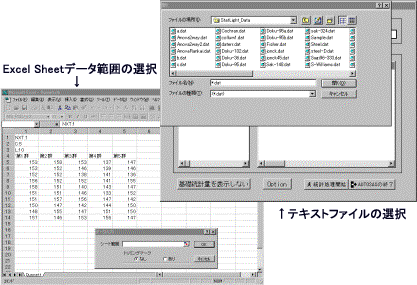
Above Screens in Japanese only |
|
| |
|
| Checking selected data |
Verification results
appeared |
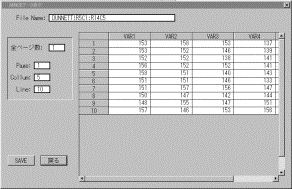
Above Screen in Japanese only |
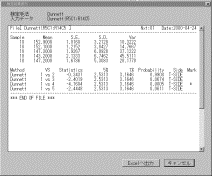
Above Screens in Japanese only |
|
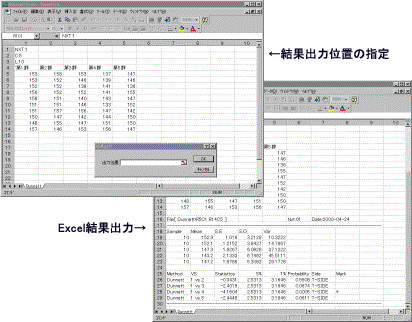
| Output of results in
Excel |
|
|
Above Screens in Japanese only |
|
| |
| List of Statistical Methods in
AutoSAS21 |
| |
| Classification
of Statistical Methods |
Statistical Method |
| Verification
of 2 groups |
Paired t-test,F&t-test,Wilcoxon
Rank Sum test,Sign-Wilcoxon test |
| Verification
of multiple groups (para) |
1-Way ANOVA,Tukey-Kramer,Dunnett,Williams,Bartlett
test,Levene,
Shapiro-Wilk |
| Verification
of multiple groups (nonpara) |
Jonckheere,Kruskal-Wallis,Shirly-Williams,Steel,Steel-Dwass |
| Categorical
verification |
Cochran-Armitage,Chi-Square(2*2,m*n),Fisher
exact test(2*2,m*n) |
| Dispersal
analysis |
1- way layout, 2-way
layout,3-way layout (random analysis,
random block analysis, branched analysis, split
analysis) dispersal analysis |
| Regression
analysis |
Probit analysis
by Linear Regression Model,LHM, Logit analysis by LHM |
| Decision
tree format |
Bartlett/1-Way ANOVA/Kruskal-Wallis/Dunnett/Steel/Williams/Shirly-Williams
Bartlett/Dunnett/Steel
Bartlett/1-Way ANOVA/Kruskal-Wallis/Tukey-Kramer/Steel-Dwass
Bartlett/Tukey-Kramer/Steel-Dwass |
|
| |
 |
| Operating environment of AutoSAS21 |
| |
| Principal
device |
CPU
with i386 or i486,Pentinum etc. |
| OS
and software |
Windows95/98/2000/NT
Japanese version
Microsoft Excel97/2000
Windows Version SAS release 6.11/6.12(BaseSAS and SAS/STAT)installed
and operable |
| Required
memory |
Over 12MB recommended |
| Driver |
3.5inch 2HD Floppy
Disk Unit required for initial adoption |
| Printer |
Windows-compliant |
| Display |
Windows-compliant |
| Hard
disk |
2MB free space.
Able to operate Microsoft Excel. |
|
| |
| Price ¥70,000 (consumption
tax @5% ¥3,500) |
| |
| To install SAS as the
statistical engine in the existing system, orders for the creation
of a system using SAS may be placed with our company. |
| Affiliated with SAS Pertner's Group(SPG)members |
| |
| This software requires software
of Windows95/NT, Excel95/97/2000 of the American company Microsoft
and Base SAS,SAS/STAT of the American SAS institute. |
| Company names and product names
mentioned in this pamphlet are the trademarks of the respective
companies or registered trademarks. Published contents etc.
may be upgraded and changed without prior notice. |
| |
| Developed by Yukms
Co., Ltd |
| Sold by Plum Network
Pvt Ltd |