StatLight series is
the full-fledged add-in software compliant with the user-friendly
version of Microsoft Excel. This software enables the graphic
images of data in different dimensions and carries out investigations
of the outlier or case errors, the distribution of data and
understanding analysis, usage etc. of StatLight #2, #3, #4 from
the graph screen.
Basic usage method
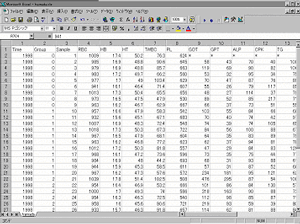
Excel Data Sheet
Select
graph from Add-in menu
Investigation
of data using graph Investigation of abnormal values
Statistical
Operation(Group1, Group2, Multiple Group test)
The 66th Medical and
Pharmaceutical Research Council (1996,April,Tokyo) "Blood/Biochemical
value of Rat after 4 dosages" Research Report Page 16
Click to view the enlarged figure.
Set
example in Excel Sheet
Above Screen in Japanese only
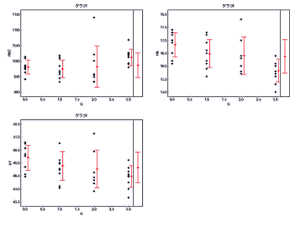
List
of graphs showing outlier
Above Screens in Japanese only
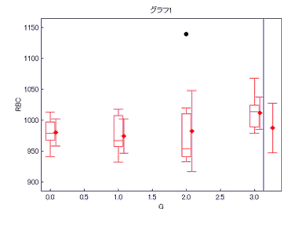
Graph
showing boxes
Above Screen in Japanese only
Plotted
Graph showing confidence interval
StatLight#4
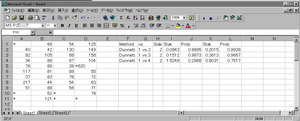
Multiple comparison examination of Dunnett after comparing
many groups
Above Screen in Jpanese only
For
Cpk item, multiple comparisons of Dunnett are performed
when the outlier of the 4th group is included or
excluded by box figures.
All data 1 vs 4 Probability 0.2988
Exclusion
process 1 vs 4 Probability 0.7517
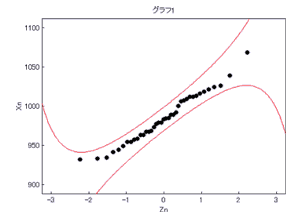
Data
exclusion process is carried out for each plot of
scatter graph.
Graph
Spread sheet of data
The
order of Time/Group/Individual/Item is fixed as shown below.
(The format shown below is known as 1D data format.)
column 1
column 2
column 3
column 4
column 5
.......
column x
line 1
Time
Group
Individual
Item 1
Item 2
.......
Item n
line 2
time1
grpoup1
ID1
item11
item21
.......
itemi1
line 3
time1
grpoup1
ID1
item12
item22
.......
itemi2
...
...
...
...
...
...
.......
...
...
...
...
...
...
...
.......
...
line y
timet
grpoupk
IDj
item1j
item2j
.......
itemij
Use Excel sheet data Combines
the data of the above sheet in 1 dimensional data format using
conversion function.
Use Text file data 1
dimensional data format
Use Binary file data 1
dimensional data format
Graphs can also be used independently
Introduction
Company names and product
names mentioned in this pamphlet are the trademarks of the respective
companies or registered trademarks. Published contents etc.
may be upgraded or changed without prior notice.